Server requirements
Themeasy is built on Elementor. To run it smoothly — a Themeasy theme with the Setup Wizard, one-click demo import and (optionally) WooCommerce, or the Themeasy plugin in any other theme — your hosting should meet the requirements below. The plugin needs the free Elementor plugin in every case.
Check them before installing the Themeasy theme or the Themeasy plugin.
Recommended
For the best experience, your host should provide:
- PHP 8.1 or higher
- WordPress — latest stable version
- MySQL 8.0+ or MariaDB 10.6+
- WP Memory Limit: 512 MB (256 MB if you are not running WooCommerce)
- SSL certificate (HTTPS) active on the site
- The server able to make outgoing HTTPS connections (for license activation, automatic updates and demo import)
Minimum (supported)
These are the floors Themeasy runs on. They are supported, but upgrade when you can:
- PHP 7.4
- WordPress 6.8 — or 7.0 if you use WooCommerce
- MySQL 5.7 / MariaDB 10.5
- WP Memory Limit: 256 MB
Recommended vs minimum at a glance
| Item | Minimum (will run) | Recommended | Notes |
|---|---|---|---|
| PHP | 7.4 | 8.1 or higher | PHP 7.4 is end-of-life; PHP 8.x is faster and the path Elementor and WooCommerce optimize for. |
| WordPress | 6.8 (7.0 with WooCommerce) | Latest stable | Always run the latest version — security fixes, Elementor and WooCommerce all target it. |
| Database | MySQL 5.7 / MariaDB 10.5 | MySQL 8.0 / MariaDB 10.6+ | WordPress itself recommends MySQL 8.0+ or MariaDB 10.6+. |
WP memory limit (WP_MEMORY_LIMIT) |
256 MB | 512 MB | Elementor needs 256 MB on its own; a Themeasy + WooCommerce site wants 512 MB. |
| HTTPS / SSL | required | required | WordPress requires it, and license activation and checkout run over HTTPS. |
| Web server | Apache / Nginx / LiteSpeed | Nginx or LiteSpeed | Any server that runs PHP and MySQL works. |
| URL rewriting | mod_rewrite (Apache) / try_files (Nginx) |
same | Needed for pretty permalinks. |
| Outgoing HTTPS (port 443) | required | required | Used for license activation, automatic updates and demo import. |
Note
If your host blocks outgoing connections, license activation, automatic updates and demo import can't work — ask the host to allow outgoing HTTPS.
Recommended PHP settings
These match what Elementor recommends, with the headroom a Themeasy + WooCommerce site needs. The
two that most often break Elementor on default hosting are max_input_vars (the default of
1000 is too low for the editor) and memory_limit.
| Directive | Recommended value |
|---|---|
memory_limit |
256M (512M for WooCommerce stores) |
max_execution_time |
300 |
max_input_time |
300 |
max_input_vars |
5000 |
post_max_size |
64M |
upload_max_filesize |
64M |
Sending this to your host, or editing php.ini yourself? Copy the block:
memory_limit = 256M          ; 512M for WooCommerce stores
max_execution_time = 300
max_input_time = 300
max_input_vars = 5000
post_max_size = 64M
upload_max_filesize = 64M
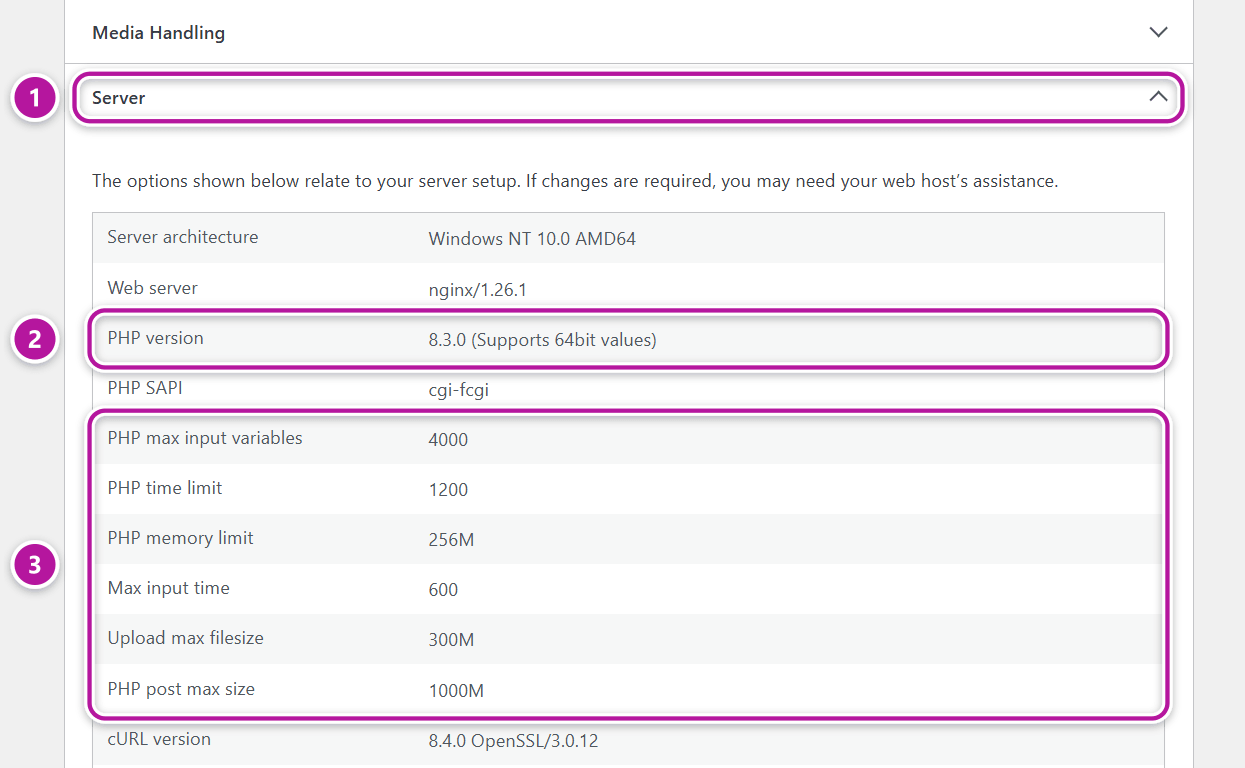
You can check your server's current values in WordPress under Tools → Site Health → Info, in the Server section.
Using the plugin without a Themeasy theme
Running the Themeasy plugin on another theme — Themeasy Lite, or a Widgets, Pro or Agency plan? The same requirements apply: PHP 7.4 and WordPress 6.8 at minimum, with the free Elementor plugin active. The theme you use may ask for more, so check its own requirements too. See Themeasy Widgets for how the plugin works on any theme.
Editor won't load or demo import stalls?
Tip
Most quality WordPress hosts already meet these requirements. If the Elementor editor fails to
load or demo import stalls, the usual cause is a low memory_limit or max_input_vars — ask your
host to raise them to the values above.
Almost every managed WordPress host also provides the PHP extensions Themeasy relies on — dom
(for safe SVG uploads), zip (for plugin installs and updates) and an image library (gd or
imagick). These only need checking on very low-cost or locked-down plans.
Next steps
Hosting checks out? Get your site up and running:
Was this article helpful?