Per-page settings (style, spacing, performance)
Most Themeasy options are site-wide, but sometimes a single page needs to look or behave differently. Themeasy adds its own sections to Elementor's Page Settings, so the change applies to that page only — no code, nothing global touched.
To open them, click the gear icon in the Elementor editor (Page Settings) and look across the Settings, Style and Advanced tabs.
Availability
These per-page sections are part of the full Themeasy toolkit: you need a Themeasy theme and a Pro or Agency plan (a Themeasy theme bought on its own unlocks them too). They aren't included in Themeasy Lite or the Themeasy Widgets plan.
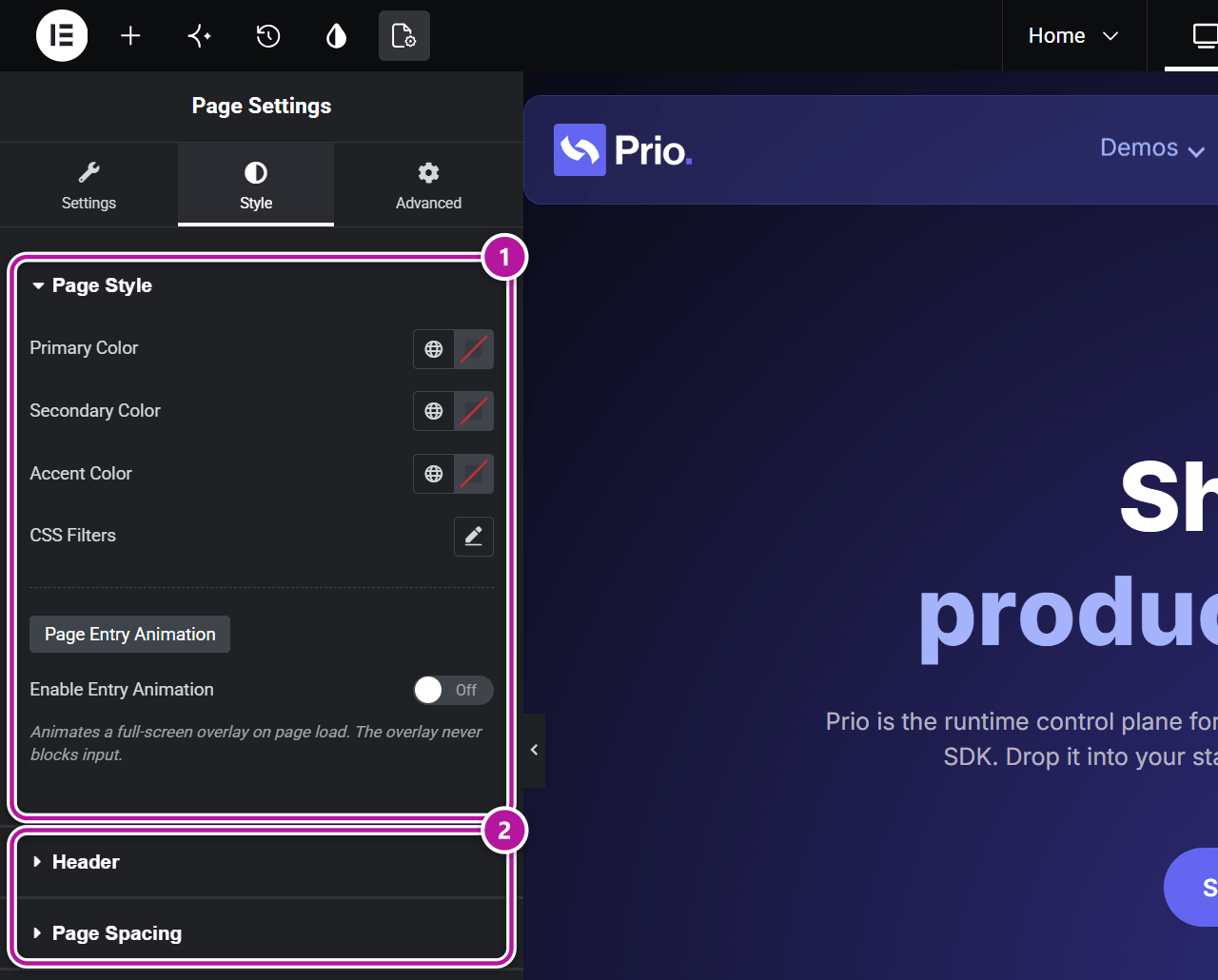
| Tab | Section | Use it to |
|---|---|---|
| Settings | Page Variants | Tag the page as Dark Mode, One-Page or Landing Page. |
| Style | Page Style | Override brand colors, tint the page, play an entry animation. |
| Style | Header | Decide how the header sits above this page's first section. |
| Style | Page Spacing | Set padding and gap defaults for the page's sections. |
| Advanced | Performance & UX | Override the Preloader, Smooth Scroll and Breadcrumbs. |
Page Style (Style tab)
Restyle this one page:
- Primary Color, Secondary Color, Accent Color — override those three brand colors for this page only. Everything on the page that uses the matching Elementor global color follows.
- A CSS Filters group — tint the whole page with Blur, Brightness, Contrast, Saturation and Hue.
- Page Entry Animation — play a full-screen overlay as the page loads. The overlay never blocks clicks or typing.
| Control | What it does |
|---|---|
| Enable Entry Animation | Switches the overlay on. |
| Animation Type | Curtain Up, Wave Up or Fade. |
| Overlay Color | The color of the overlay. |
| Duration (ms) | How long the animation takes, from 200 to 3000 ms. |
| Delay (ms) | How long to wait before it starts, up to 1000 ms. |
Header (Style tab)
Your header's Scroll Behavior applies to every page that uses it. First Section lets one page decide differently:
| Option | What it does |
|---|---|
| Inherit | Follow the header's own setting. |
| Overlap first section | The header floats on top of the page's first section. Use it for a full-width hero designed to run under the navbar. |
| Reserve space above | Always leave room for the header above the content. Use it for a page with no hero under a header set to Absolute (overlaps first section). |
The header keeps its own Scroll Behavior either way: a Relative navbar scrolls away with the hero, while an Always Fixed or Smart Hide/Show one stays pinned. See Build a header with containers.
Page Spacing (Style tab)
Set this page's spacing defaults in one place. Switch on Enable Page Spacing, then adjust:
| Group | Controls |
|---|---|
| Hero / First Section | Padding for the page's first section. |
| Sections | Padding for every other section. |
| Inner Container Gaps | Row Gap and Column Gap inside containers. |
| Grid Container Gaps | A separate Row Gap and Column Gap for grid containers. |
| Reset Child Container Padding | Zeroes the padding on inner child containers — useful for symmetric two-column layouts. |
The padding and gap controls are responsive, so you can set them per device. They apply to the page's own top-level sections, not to your header, footer or other Global Sections.
Tip
Page Spacing sets defaults. A section's own Container Padding still wins, so you can override any single section as usual.
Performance & UX (Advanced tab)
Override three site-wide behaviors for this page. Each is a three-way choice — Inherit (follow the global setting), Enable or Disable:
| Control | Site-wide setting it overrides |
|---|---|
| Preloader | The Preloader in Performance & UX. |
| Smooth Scroll | Smooth Scroll in Performance & UX. |
| Breadcrumbs | Enable Breadcrumbs on the General tab of the Settings panel. The Breadcrumbs widget isn't affected. |
Page Variants
The Page Variants section on the Settings tab tags a page as Dark Mode, One-Page or Landing Page, so Global Sections and styling can target it in bulk. It has its own guide — see Page Variants.
Where to go next
Was this article helpful?